Add employees and read the org chart
Add one employee, import many from a CSV file, and see who reports to whom.
Only HR sees Add employee and Import in the Directory. Everyone else can search the directory and open profiles.
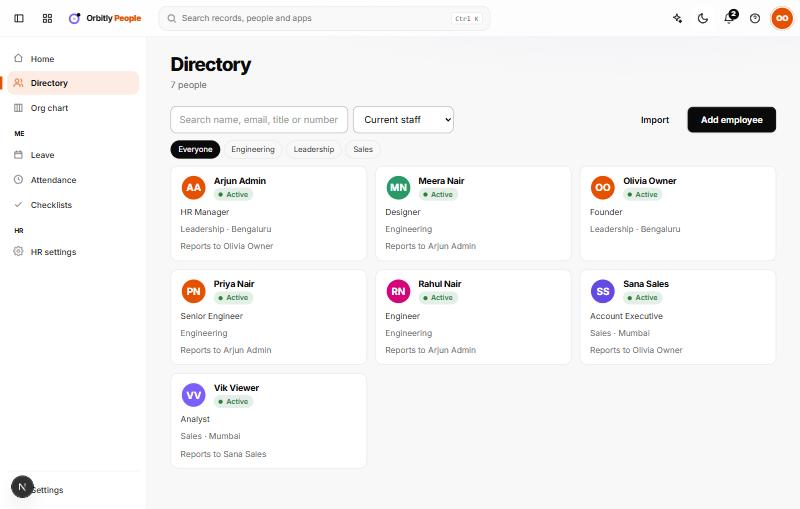
Add one employee
- Open Directory and choose Add employee.
- Enter the First name and Work email. These two are required.
- Fill in Last name, Job title, Location, Department, Manager and Date of joining if you know them.
- Choose Add. The new person's profile opens.
If the work email matches a person already in your organisation, the two are linked and the employee can use leave and attendance themselves. To invite someone who is not in your organisation yet, see Invite people to your organisation.
Import from a CSV file
- Choose Import.
- Pick a .csv file, or paste the rows into Paste CSV. The first row must be the column names.
- Use these columns: first_name, last_name, work_email, job_title, department, manager_email, date_of_joining, location.
- Choose Import. A message shows how many were added and how many were skipped, with the reason for the first few problem rows.
Rows whose email already exists are skipped, so it is safe to run an import again.
Find people
Type in the search box to search by name, email, title or number. Use the department buttons under it to narrow the list. HR can also switch the list from Current staff to former staff or everyone.
Change a record
Open a person to see their profile. HR can edit job title, department, who they Reports to, location, employment type and dates on the Job tab. People can edit their own phone and personal email.
Read the org chart
Open Org chart to see the reporting tree. People with nobody above them are at the top; each card shows the name, title and how many people report to them. Use the − and + buttons above the chart to zoom out and in, and Reset to return to 100%. Choose a card to open that person's profile. The chart is built from the Reports to field, so keep it up to date.
Was this not what you needed? Contact support or search again.