Get started with People
Learn what People is for, where things are, and the first three things to set up.
People keeps your employee records, leave and attendance in one place. Everyone in your organisation can see the directory and request leave. HR (people who can manage People) also adds employees and sets the rules.
Where things are
The sidebar has these pages:
- Home: your leave balance, leave waiting for your decision, your checklist tasks, headcount, a Check in button, upcoming holidays, who is away this week, and birthdays and work anniversaries.
- Directory: everyone in the organisation, with search and a department filter.
- Org chart: who reports to whom.
- Leave: your balances and requests, requests from your team, who is away, and holidays.
- Attendance: check in and out, and see your month.
- Checklists: onboarding and offboarding tasks that are waiting for you.
- HR settings: departments, leave, holidays, shifts and office areas. Only HR sees this page.
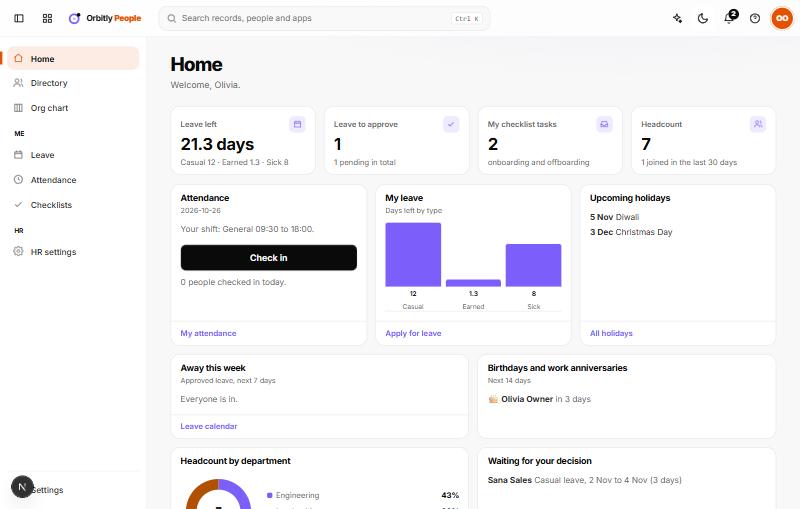
Your first three steps (HR)
On Home, a Set up People card lists the steps and ticks them off as you go.
- Add departments and set up leave types, then grant the year. See Set up leave, holidays and shifts.
- Add your people, one by one or from a CSV file. See Add employees and read the org chart.
- Add your public holidays, so they are skipped when leave days are counted.
If you see "You do not have an employee record yet"
Leave and attendance work only for people who have an employee record. If your work email matches a record, you are linked automatically. If not, ask HR to add you.
Next
Was this not what you needed? Contact support or search again.