Work your pipeline
Add a deal, drag it from stage to stage, and see what your open deals are worth.
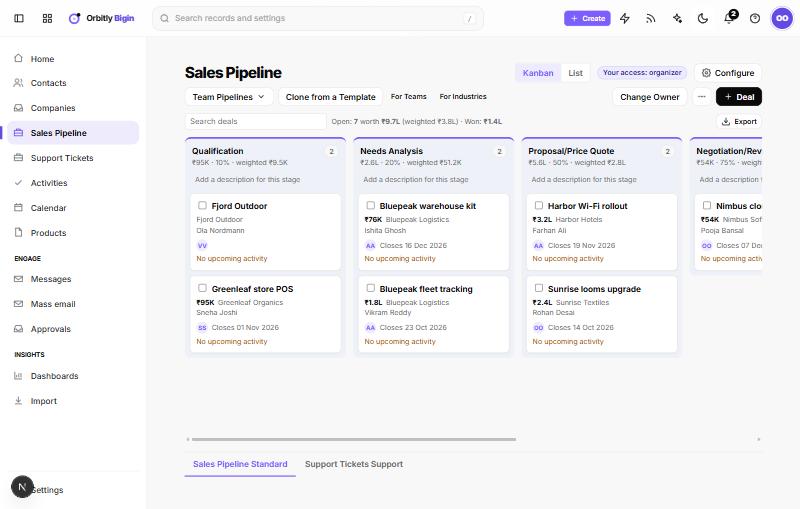
A pipeline is a board with one column per stage. Each deal is a card that moves from left to right as it gets closer to a sale.
Open a pipeline
Pick a pipeline in the sidebar, for example Sales Pipeline. The tabs at the bottom of the page and the Team Pipelines menu switch between pipelines you can open.
Each column heading shows the stage name, how many deals it holds, their total amount, the stage's win probability and the weighted amount. A line under the heading shows open, weighted and won totals for the whole board.
Add a deal
- On the pipeline, choose + Deal. The button carries the name your pipeline uses for its records.
- Enter the deal name. It is required.
- Pick the Company Name and Contact Name if they are already in Bigin.
- Choose the Stage, and set Amount and Closing Date.
- Choose Save.
You can also open a contact, choose the More menu and then Add to a pipeline. The contact and their company are filled in for you.
Move a deal
Drag a card to another column. The amounts on both columns update straight away. If the move cannot be saved, you see a message and the card goes back.
You can also open a deal and select a stage in the stage bar at the top. The page tells you how many days the deal has been in its current stage.
Won and lost stages are shown in their own colours, and won deals count in the Won total.
Each card at a glance
A card shows the amount, company, contacts, owner, closing date and tags. The last line shows the next planned activity, or No upcoming activity in orange when an open deal has none. Fix that with Schedule tasks, events and calls.
Find and filter deals
- Type in Search deals to narrow the board.
- Switch Kanban to List at the top for a table with filters and views.
- Choose Export to download the board's records.
Act on several deals
Tick the box on each card, then use Change Owner or the More menu for Add tags, Send email or Delete. If nothing is selected, Bigin asks you to select deals first. Deleted records go to the recycle bin.
Change the stages
People with the Organizer access level see Configure next to the board. Admins can also create another team pipeline from the Team Pipelines menu or with Clone from a Template (For Teams or For Industries).
Next: Send a mass email or check progress on a dashboard.
Was this not what you needed? Contact support or search again.