Switch between Day, Week, Month and Agenda
Change how the calendar is laid out and move around quickly with the keyboard.
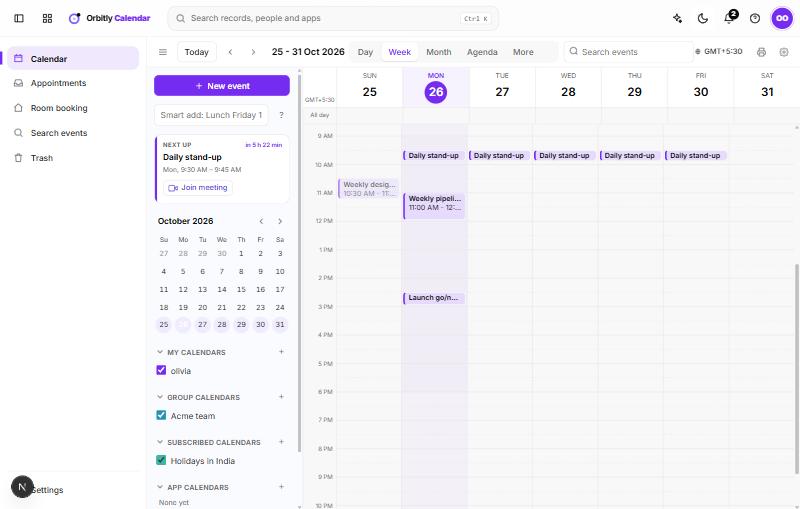
The toolbar above the grid controls what you see.
Change the view
Use the buttons on the right of the toolbar:
- Day, Week, Month and Agenda are the four everyday views. Agenda lists your events one after another.
- More opens a list with Work week, 2 Months, 3 Months and Year.
Use Today to jump back to the current date, and the arrows beside it to step by a day, week or month, depending on the view. Click the date range itself to open a small calendar and jump to any date. You can also click a day in the month calendar in the calendar panel.
Keyboard shortcuts
When the cursor is not in a text box, these keys work:
- 1, 2, 3, 4: Day, Week, Month, Agenda
- T: go to today
- C: start a new event at the next half hour
- /: jump to the Search events box
Choose which calendars show
In the calendar panel, each calendar has a tick box. Untick it to hide that calendar's events from the grid. The ... menu next to a calendar has Display only this calendar, which hides all the others in one step.
Show another time zone
Choose the time zone button in the toolbar, search for a zone, and pick it. The grid redraws in that zone and your choice is saved to your preferences.
Was this not what you needed? Contact support or search again.