Create a form
Start a new form from a template, from scratch, or by importing one you exported.
There are three ways to start. Choose New Form on All Forms, or New form in the sidebar.
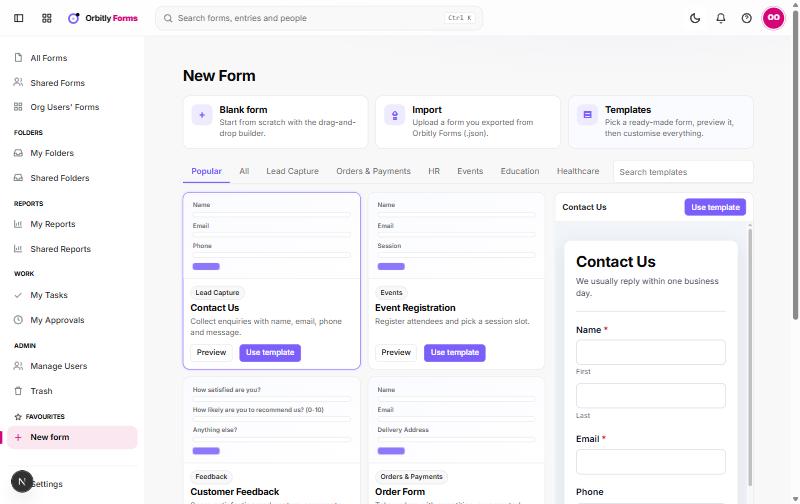
Start from a template
- Pick a category tab such as Popular or All, or type in Search templates.
- Move over a template to see a live preview on the right, or choose Preview.
- Choose Use template.
- In Create form, enter a Form name and choose a Form type.
- Choose Create. The builder opens with the template's fields, which you can change freely.
Start from a blank form
Choose Blank form, name it, pick a type and choose Create. You start from an empty page in the drag-and-drop builder.
Pick a form type
- Standard: all fields on a page, with optional page breaks.
- Card: one question per screen.
- Spotlight: one page, with the active question highlighted.
Import a form
Choose Import and select a .json file. These come from a form's own menu on All Forms, using Download as JSON. Rules and settings in the file come along, but entries do not. Files over 2 MB are refused.
Copy an existing form
On All Forms, open a form's menu and choose Duplicate. You can choose whether to copy its rules and integrations. From the same menu you can Rename, Move to folder, Transfer ownership or move it to trash with Delete. Deleted forms stay in Trash until you choose Restore or Delete forever.
Next, build the form.
Was this not what you needed? Contact support or search again.