Send payment reminders
Remind customers about unpaid invoices by hand, in bulk, or on an automatic schedule.
Invoice can email customers about invoices that are unpaid. You can send a reminder yourself, send several at once, or set rules that send them for you.
Remind one customer
- Open an invoice that has been sent and is not fully paid.
- Open More and choose Send Reminder.
The invoice's History panel records each reminder. The same More menu has Stop Reminders, which switches off reminders for that one invoice, and Resume Reminders to turn them back on.
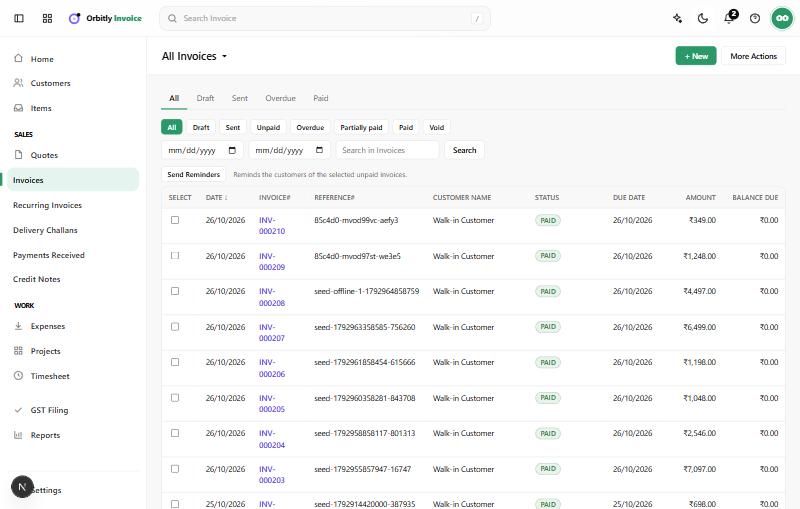
Remind several customers at once
- Open Invoices and filter by Unpaid or Overdue.
- Tick the invoices in the Select column.
- Choose Send Reminders.
A message tells you how many were sent. Invoices that are paid, still drafts, or whose customer has no email address are skipped and counted as not sent.
Say when you expect to be paid
On an open invoice, the Expected Payment Date card lets you save the date a customer promised to pay. Automatic reminders can be set to work from it.
Set up automatic reminders
- Open Settings and choose Reminders under Preferences.
- Under Automated Reminders, choose Edit on a rule, or New Reminder to add one.
- Set Remind to a number of days, Before or After, the due date or the expected payment date.
- Choose who gets it in Send to: Customer, Me (your organisation's admins), or Customer and me.
- Edit the Subject and Body. You can use placeholders such as %CustomerName%, %InvoiceNumber%, %Balance% and %DueDate%.
- Choose Save. Use Enable or Disable on a rule to switch it.
Each rule sends at most once for an invoice. Manual Reminders on the same page holds the wording used when you send a reminder yourself.
Next: Record a payment when the money arrives.
Was this not what you needed? Contact support or search again.