Get started with Books
Learn where things are in Orbitly Books and the first three things to do before you send your first invoice.
Orbitly Books keeps your accounts. You sell with quotes and invoices, buy with bills and expenses, connect your bank, and see where the business stands in reports. The screens are set up for Indian businesses: amounts are in rupees and GST fields appear on customers, items and invoices.
Find your way around
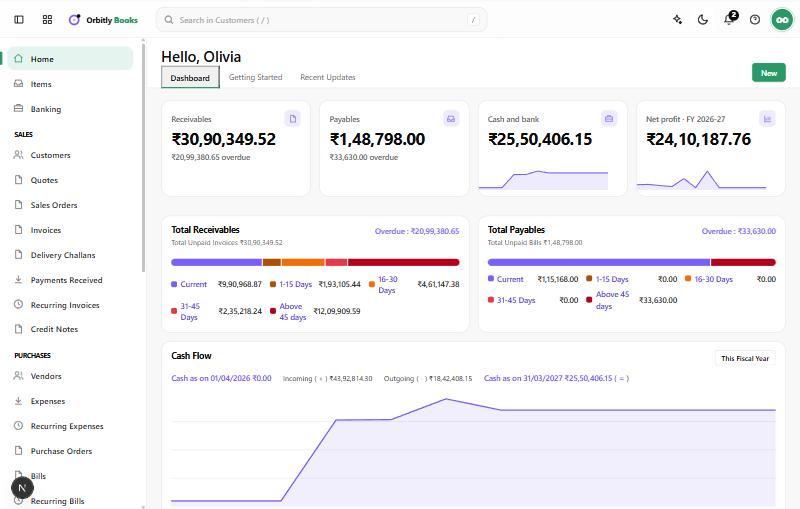
The left sidebar groups the work:
- Home shows what customers owe you, what you owe, cash and bank, and net profit for the financial year. Its Getting Started tab walks through setup.
- Items are the goods and services you sell or buy.
- Banking holds your bank, cash and card accounts.
- Sales: Customers, Quotes, Sales Orders, Invoices, Delivery Challans, Payments Received, Recurring Invoices and Credit Notes.
- Purchases: Vendors, Expenses, Recurring Expenses, Purchase Orders, Bills, Recurring Bills, Payments Made and Vendor Credits.
- Accountant: Manual Journals, Chart of Accounts and Budgets.
- Reports, Documents, GST Filing and Settings.
Do these three things first
- Set up your organisation. Open Settings and check your business details and GST information, then invite your team. See Set up your organisation and Invite people to your organisation.
- Add a customer. See Add a customer.
- Create and send an invoice. See Create and send an invoice.
Then
Was this not what you needed? Contact support or search again.