Create a list and share its signup page
Make a list of contacts and give people a page where they can subscribe to it.
A list is a group of contacts you send campaigns to. A contact can be on many lists. Each list has its own signup page that you can share.
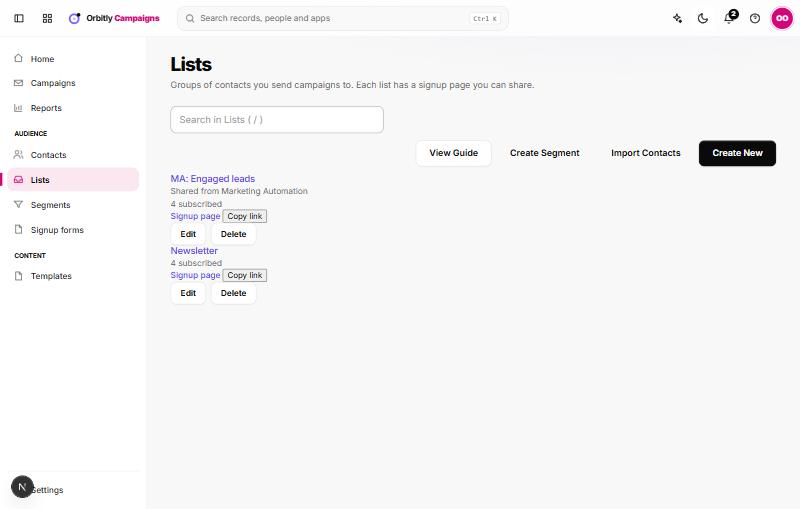
Create a list
- Open Lists and choose Create New.
- Enter a Name and, if you like, a Description.
- Tick Ask people to confirm by email (double opt-in) if new subscribers must confirm before they get campaigns.
- Choose Save.
Share the signup page
Each list card has a Signup page link and a Copy link button. Paste the link into your site, social posts or emails. The page asks for a first name and an email address. People who subscribe join the list, and the signup is recorded in the consent log.
With double opt-in on, new subscribers are sent a confirmation email first and wait as pending until they open its link. You can change that email and the thank-you message under Settings, Double opt-in.
Signup forms
Under Signup forms you can create a named form tied to one list, with an optional heading. Choose Create Form and you get a link to Open form or Copy link. Create a list first, because a form adds people to a list.
Manage a list
- Edit changes the name, description and double opt-in.
- Delete removes the list but keeps its contacts.
- Open a list to see tabs Contacts, Overview, Associations and History.
To add people you already have, use Import Contacts. See Import contacts.
Was this not what you needed? Contact support or search again.