Get started with Mail
Find your way around Orbitly Mail and learn what it can send and receive today.
Orbitly Mail is business email for your organisation, with extras for working together: Streams, Tasks, Notes, Bookmarks and Contacts.
Where things are
The app sidebar has Mail, Streams, Tasks, Notes, Bookmarks, Contacts and Settings. A search box above the mail list searches your mailbox.
Inside Mail, the left column has:
- New Mail to write a message.
- Your folders: Inbox, Drafts, Templates, Snoozed, Sent, Spam, Trash and Archive.
- Views that look across folders: Unread, Flagged, Attachments and All messages.
- Folders and Tags you create yourself.
- A storage meter at the bottom.
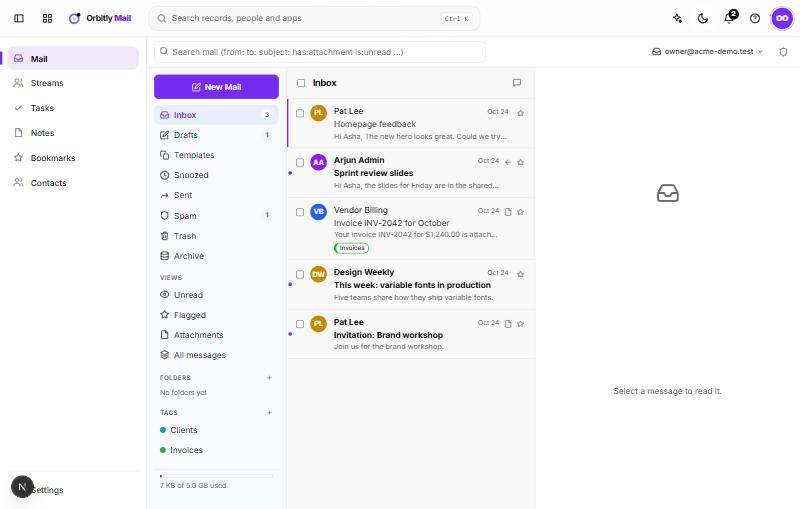
Choose a message to read it in the pane on the right. Reply, reply all and forward are at the top of the message. The More actions menu has more, such as Create a task, Add to Notes, Share in Streams, Print and Download (.eml).
What mail can reach today
Your first three things
- Write a message: Write, reply and send.
- Sort your inbox: Organise mail with folders and tags.
- Learn the search box: Search your mail.
Beyond email
- Tasks holds your to-dos, with due dates, reminders and repeats. Any email can become a task from More actions > Create a task.
- Notes is for jotting ideas and keeping snippets from emails. A note can be sent as an email.
- Bookmarks saves links into collections you can share with your team.
- Streams lets a group talk about an idea or an email in one place. See Talk it through in Streams.
Was this not what you needed? Contact support or search again.