Talk it through in Streams
Start a post for a group, share an email into it, and discuss it with comments instead of a long reply-all.
Streams is for conversations that belong to a group. Post an idea, share an email or draft, and let people comment.
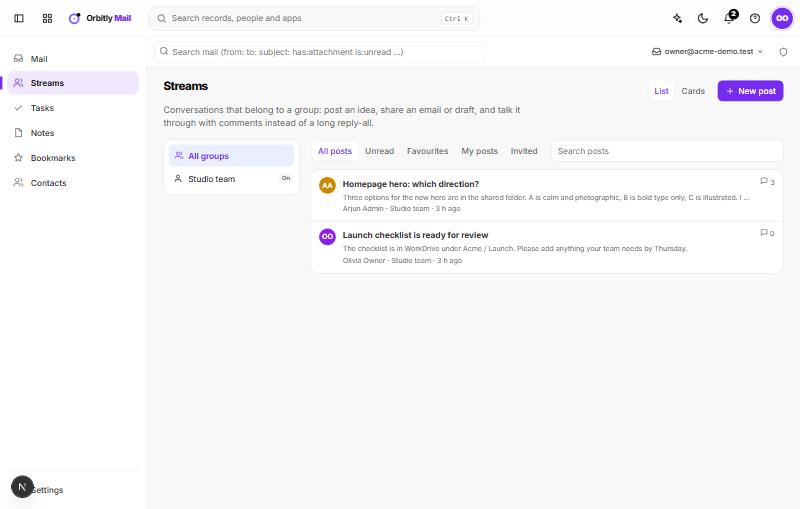
Find your groups
Your groups are listed on the left, with All groups at the top. If you are a moderator of a group (or a mail administrator), a small On or Off button beside the group shows whether Streams is turned on for it, and you can choose it to switch it. Other people do not see this button. A group with Streams off cannot be opened.
Start a post
- Choose New post.
- Pick the Group, enter a Title and add the Details.
- Choose Post.
If a group has no posts yet, Start the first one does the same.
Share an email
Open a message, choose More actions > Share in Streams, and pick the group. For a draft, the same menu item reads Ask a group for feedback.
Read and reply
Use the tabs to filter: All posts, Unread, Favourites, My posts and Invited. Switch between List and Cards at the top, or search with Search posts.
Open a post to read it, then write in Write a comment and choose Comment. Ctrl + Enter also sends. The star marks a post as a favourite. You can copy a link to a single comment, and delete your own comments.
Bring in someone outside the group
The author of a post, or a moderator of its group, sees an Invite button on the post. Choose a Person, set They can to Read and comment or Only read, then choose Invite. People you invite see only that post, in their Invited tab.
Related: Get started with Mail.
Was this not what you needed? Contact support or search again.